Certificates
How HTTPS works in Belune and reading the certificate status.
Belune obtains and renews HTTPS certificates for you. This page explains the three SSL modes, how to read a domain's TLS status, and how to run behind Cloudflare in Full (strict) — the recommended proxied setup.
The Three SSL Modes
Set per-domain under an application's Domains tab.
| Mode | What happens | Use when |
|---|---|---|
| Automatic | Caddy obtains a free Let's Encrypt certificate over ACME and renews it. | The normal case: the domain points here and ports 80/443 are open. |
| Custom | Belune serves a certificate you uploaded under Settings → Certificates. | Behind Cloudflare with an Origin CA cert, or your org issues its own. |
| Off | Plain HTTP only. No certificate is requested. | Internal-only hostnames, or TLS terminated elsewhere. |
What Automatic Mode Needs
Let's Encrypt validates control of the domain by connecting to it from the public internet. All three must be true:
- DNS points to your instance — an
AorAAAArecord for the exact hostname resolving to Belune server's public IP. - Port 80 is reachable — this is the HTTP-01 challenge, and it is not optional even though the site runs on 443.
- Port 443 is reachable — so the certificate can be served once issued.
Belune checks each domain's DNS against the server's public IP and warns you when a record points somewhere else.
Reading the TLS Status
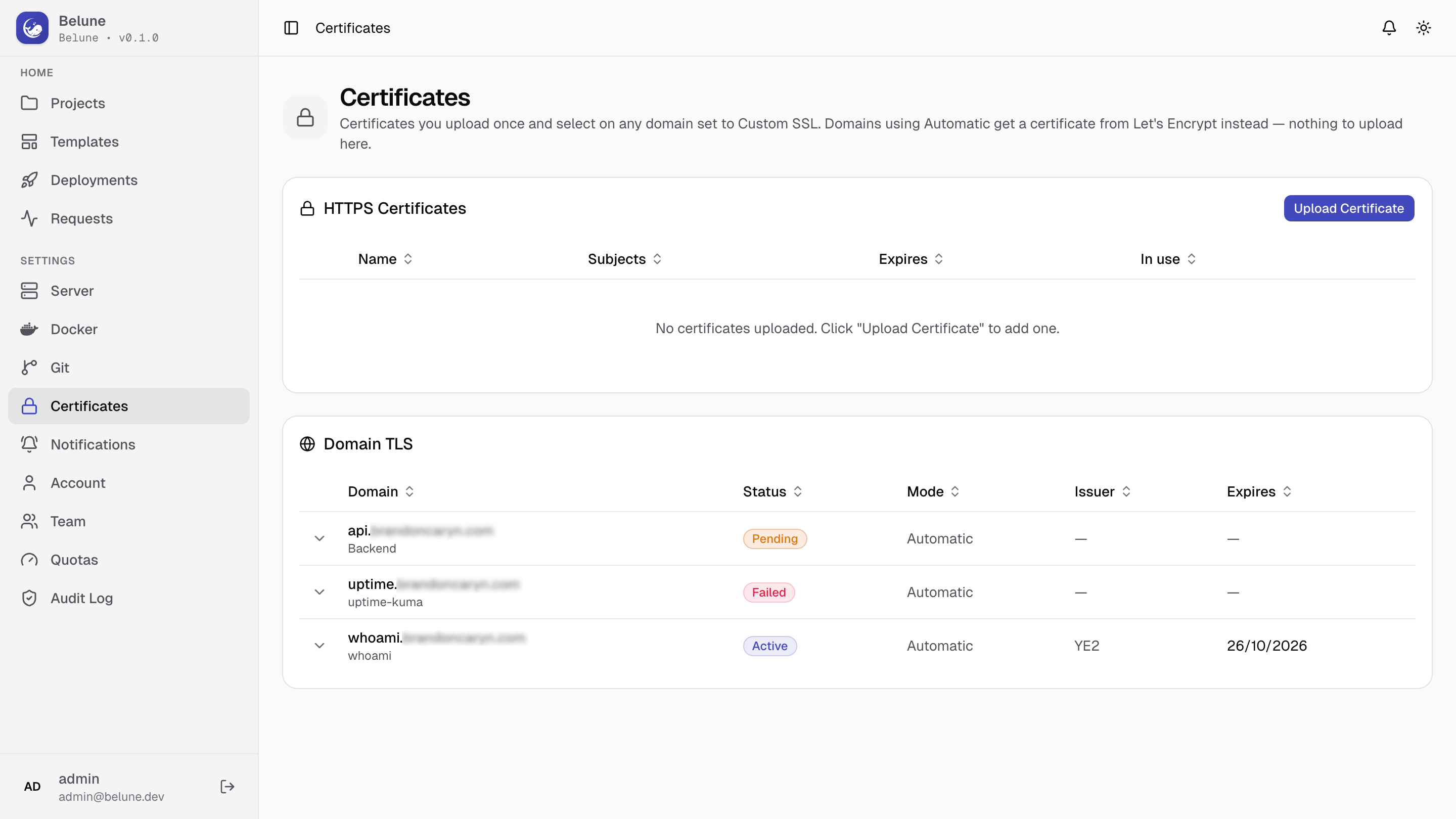
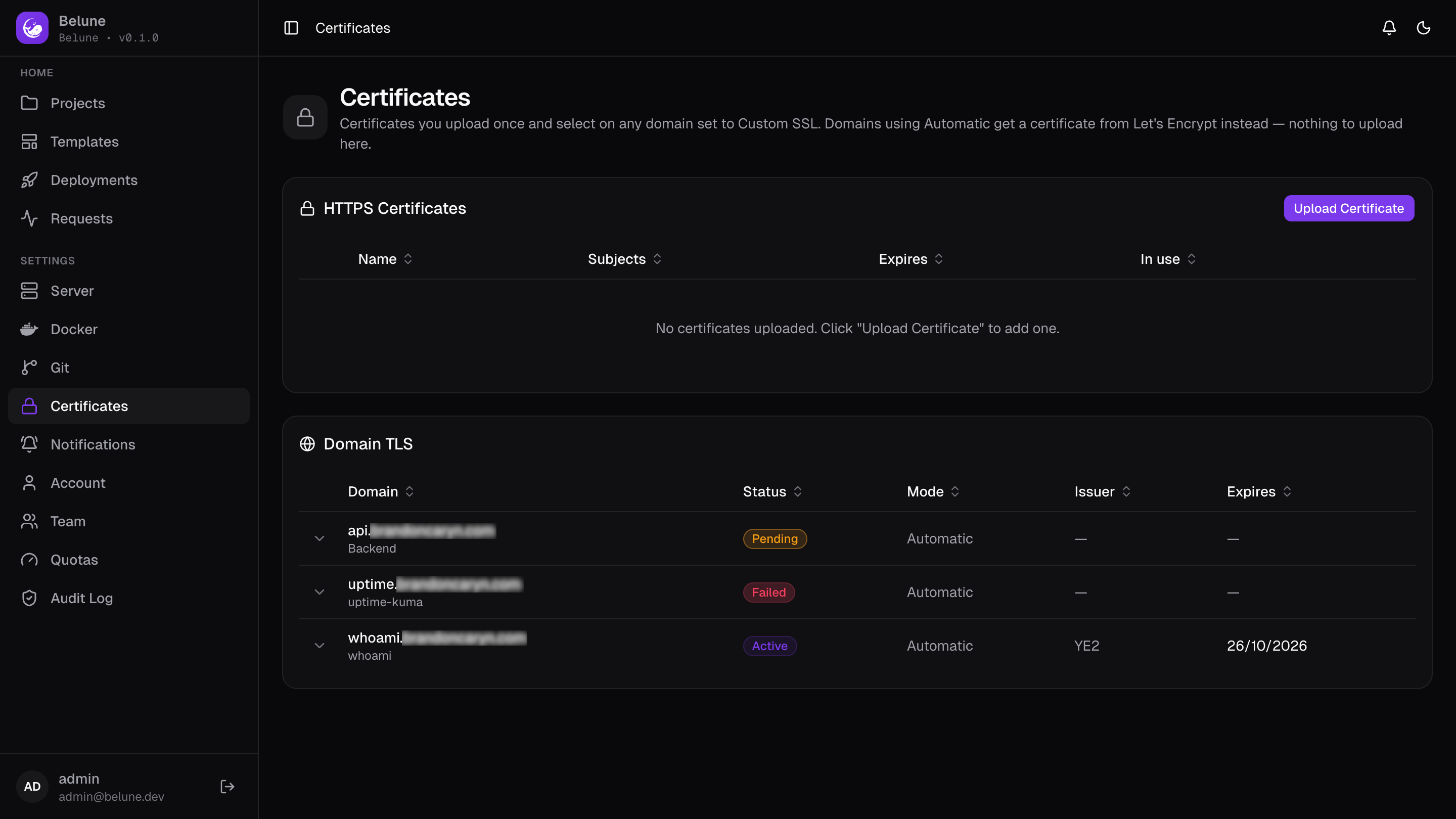
Every domain shows a TLS badge, click it for the issuer, expiry, last check, and any error.
Settings → Certificates lists every domain's status in one table. The domain's status is what Belune has observed on the wire.
| Status | Meaning | What to do |
|---|---|---|
| Active | A valid certificate is being served. | Nothing. |
| Pending | No certificate yet. Normal for the first minute or two. | Wait. If it persists, recheck the three needs. |
| Failed | Issuance failed, and the reason is in the badge. | See common failures below. |
| Expiring | Expires in under 14 days and hasn't renewed. | Treat as Failed (Automatic) / re-upload (Custom). |
| Expired | Past expiry — HTTPS is broken now. | Same as Expiring, urgently. |
| Off | ssl_mode=off. No certificate wanted. | Nothing. |
Recheck now in the badge re-probes immediately — use it after fixing DNS or a firewall.
Admins are notified when a domain first enters Failed, Expiring, or Expired.
Common Failures
The reason in the badge comes from Caddy's logs, so it is the ACME server's actual complaint.
- "…resolves to X, not this server" — the DNS
AorAAAArecord points elsewhere. Fix it, then Recheck now. (Expected and harmless behind Cloudflare's proxy; issuance still works — see below.) - "…does not resolve" — no DNS record exists. Create one.
rateLimited— Let's Encrypt rate-limits repeated failures, per domain per week. Fix the underlying cause first; the limit expires on its own.caa— a CAA record forbids Let's Encrypt. Remove it or addletsencrypt.org.- Connection refused / timeout — port 80 isn't reachable. Check the host firewall and the cloud provider's security group (usually the latter).
Cloudflare
With Cloudflare proxying enabled (orange cloud), Cloudflare terminates TLS for your visitors and forwards requests to your server. The hop between Cloudflare and you is a second, separate connection. We recommend setting TLS to Full (strict).
Using Let's Encrypt Certificate
Automatic works behind the orange cloud. Cloudflare forwards the ACME challenge to your origin, so Let's Encrypt validates and issues normally. The simplest supported setup:
- In Cloudflare, set SSL/TLS → Overview → Full (strict).
- Leave the domain on Automatic and wait for its badge to reach Active
- Belune now holds a publicly-trusted Let's Encrypt certificate.
Using a Cloudflare Origin CA Certificate
An Origin CA certificate is an alternative — valid up to 15 years, not subject to ACME rate limits, trusted only by Cloudflare.
If your server is only reachable through Cloudflare, you can use this method to obtain the certificate.
- In Cloudflare, SSL/TLS → Overview, set Full (strict).
- In Cloudflare, SSL/TLS → Origin Server → Create Certificate. Cover the hostnames you need (e.g.
example.comand*.example.com). - Copy both the Origin Certificate and the Private Key (shown once).
- In Belune, Settings → Certificates → Upload Certificate, paste both PEM blocks. Belune verifies the pair and reads the hostnames off it.
- On the application's Domains tab, set the domain's SSL mode to Custom and pick the certificate.
Check which certificate your origin is really serving (the browser sees Cloudflare's edge cert, not your origin's):
echo | openssl s_client -connect <server-ip>:443 -servername belune.example.com \
  2>/dev/null | openssl x509 -noout -subject -issuer
Origin CA certificates don't renew themselves. Belune notifies admins 14 days before one expires.
Wildcards
Let's Encrypt only issues wildcards over a DNS challenge, which the stock Caddy image can't do. Each app domain gets its own certificate automatically, which covers the normal case. If you genuinely need a wildcard, issue it elsewhere and upload it as a Custom certificate.